.webp)
Most homeowners have a running mental list of things they keep meaning to fix. The lighting that’s always been slightly harsh. The front door that demands a specific angle to unlock. The thermostat that needs attention every time the season changes. None of it feels urgent enough to call someone about — but all of it is solvable, often for less than a nice dinner out.
This isn’t a list of renovations. It’s a guide to the small upgrades that homeowners consistently describe as their best low-cost decisions — the ones they wish they’d made two years earlier. It also covers the ones that disappointed nearly everyone who tried them, because that’s the half of the story most articles skip.
Quick Answer: The Most Worthwhile Affordable Home Upgrades
The best affordable home upgrades include smart thermostats, dimmer switches, under-cabinet LED lighting, and bidet attachments. Most cost between $15–$250, require no professional installation, and deliver daily quality-of-life improvements that homeowners consistently describe as their best low-cost decisions.
Top 8 picks at a glance:
- Dimmer switches ($15–$40): Immediate atmosphere transformation, 15–20 min install
- Smart thermostat ($100–$250): 8–15% average energy savings, 12–24 month payback
- Under-cabinet LED lighting ($30–$80): Functional kitchen upgrade with real aesthetic value
- Bidet attachment ($30–$80): Daily comfort + toilet paper savings over 12–18 months
- Smart plugs with energy monitoring ($15–$35): Reveals hidden energy waste on day one
- Weatherstripping ($20–$60): Silent upgrade that reduces heating/cooling loss year-round
- USB/USB-C wall outlets ($15–$25): Eliminates adapter clutter with disproportionate daily satisfaction
- Motion-activated lights ($20–$50): Convenience and passive energy saving combined
Affordable Home Upgrades: Cost vs Daily Impact at a Glance
| Upgrade | Avg Cost | DIY Difficulty | Daily Impact | Payback Period |
|---|---|---|---|---|
| Dimmer switches | $15–$40 ea | Easy | ⭐⭐⭐⭐⭐ | Immediate (comfort) |
| Smart thermostat | $100–$250 | Moderate | ⭐⭐⭐⭐⭐ | 12–24 mo (energy) |
| Under-cabinet LED lighting | $30–$80 | Easy | ⭐⭐⭐⭐⭐ | Immediate (functional) |
| Bidet attachment | $30–$80 | Easy | ⭐⭐⭐⭐⭐ | 12–18 mo (paper savings) |
| Smart plugs (energy monitoring) | $15–$35 | Very Easy | ⭐⭐⭐⭐ | Immediate (awareness) |
| USB/USB-C wall outlets | $15–$25 | Easy | ⭐⭐⭐⭐ | Immediate (convenience) |
| Weatherstripping | $20–$60 | Easy | ⭐⭐⭐ | 12–24 mo (energy) |
| Motion-activated lights | $20–$50 | Easy | ⭐⭐⭐⭐ | Immediate (convenience) |
| Smart door lock | $100–$250 | Moderate | ⭐⭐⭐⭐ | Immediate (convenience) |
| Under-sink water filter | $50–$150 | Moderate | ⭐⭐⭐⭐ | 6–12 mo (vs bottled) |
| Cabinet hardware replacement | $40–$120 | Easy | ⭐⭐⭐ | Immediate (aesthetic) |
| New showerhead | $30–$80 | Very Easy | ⭐⭐⭐⭐ | Immediate (comfort) |
Why This Question Keeps Getting Honest Answers Online
There’s something specific about home improvement advice that gets better the longer someone has lived with a decision. First-week reviews are enthusiastic. Six-month reviews start to surface the real friction. Two-year reviews — the kind you find in deep Reddit threads on r/homeimprovement and r/DIY — are where the genuinely useful information lives.
“Wish I’d done this years ago” is a phrase that shows up constantly in those threads. Not about kitchen renovations or bathroom remodels. About dimmer switches. Bidet attachments. Under-cabinet lighting. The small stuff that affects something you interact with every single day.
That’s the pattern this article is built around — not what looks good in a before/after photo, but what actually changes daily life over the long haul.
The “Daily Touch” Test — How to Evaluate Any Upgrade
Before spending anything, ask one question: does this affect something I physically touch, see, or interact with every single day?
If yes, it’s worth optimizing. If you interact with it once a month, it’s not your first priority. A garage storage system is satisfying on a Saturday. A light switch you hit every evening at 6pm is something you interact with 365 times a year — the cumulative impact of improving it is far higher than a weekend project you’ll mostly forget about.
This test cuts through the noise faster than any budget calculation.
Smart Home Upgrades That Actually Changed How People Live
There’s a specific moment that happens with the right smart home upgrade that doesn’t happen with most home improvements: you forget you installed it. That sounds like failure. It isn’t. It means the technology became infrastructure — it works seamlessly enough that you stop thinking about it and start depending on it.
That’s the bar. Not impressive demos. Not automation routines that make guests say “cool.” Quiet, consistent, daily usefulness.
The Smart Thermostat — High Setup Effort, Real Reward
.webp)
The honest case for a smart thermostat isn’t the marketing number. Nest claims up to 23% energy savings. Ecobee says similar things. The real-world average for most households is closer to 8–12% on heating and cooling costs — roughly $50–$150/year depending on your utility rates, climate, and how disciplined (or not) you were with your old thermostat.
At a $150–$250 purchase price, that’s a 1–3 year payback. For most households, that’s a reasonable return. But here’s the more honest pitch: the real value isn’t the schedule optimization — it’s the data. The first time the app shows you a heating runtime graph broken down by hour, you’ll understand exactly where your gas or electric bill is going for the first time. That visibility changes behavior more than any automation rule.
⚠️ 5-Minute Check: Is Your Home Ready for a Smart Thermostat?
Not all smart thermostats work with all HVAC systems. Installing an incompatible one can damage control boards. Do this before buying:
Step 1: Turn off power to your HVAC system at the thermostat or breaker
Step 2: Remove the current thermostat cover — usually one screw or a snap-off plate
Step 3: Photograph the wiring before touching anything — this step is important
Step 4: Count the wires and check terminals — look specifically for a wire on the “C” terminal
Step 5: Visit Ecobee’s or Nest’s online compatibility checker and enter your wire configuration
No C-wire found? Ecobee includes a Power Extender Kit that solves this for most systems. Nest has a workaround for some configurations using the Rh wire. Don’t guess — use the manufacturer’s tool.2-wire system? (Heat-only, older boiler systems) Options are limited. Check Ecobee EMS or Honeywell’s heat-only compatible lineup before purchasing anything.
Nest vs Ecobee — the distinction that actually matters: The Nest gets more marketing attention, but the Ecobee with remote sensors is often the better fit for larger homes or homes where different rooms run at significantly different temperatures. Nest learns your schedule; Ecobee actually measures where you are. That distinction matters more than it sounds if your bedroom is consistently 5°F warmer than your living room.
One more thing most people miss: Configure the HVAC filter reminder on day one, before you replace the thermostat cover. It takes 30 seconds and prevents the single most common HVAC maintenance failure. Most homeowners never find this setting.
Smart Thermostat: Pros & Cons
| ✓ Pros | ✗ Cons |
|---|---|
| Real energy savings of 8–15% average (real-world, not manufacturer claim) | C-wire required for most models; missing C-wire needs adapter or compatible model |
| Remote control and scheduling via app — especially valuable for irregular schedules | Incompatible with some 2-wire systems, certain heat pump configs, and radiant floor setups |
| Usage reports reveal exactly where your energy goes, hour by hour | App dependency: manufacturer cloud shutdown reduces functionality |
| Built-in HVAC filter reminder (set this on day one — it’s underused) | Learning mode takes 1–2 weeks to optimize before acting “smart” |
| Most work without any hub — direct Wi-Fi connection | Limited added value if your household already has very disciplined manual habits |
When to skip it: If you already turn your thermostat down manually every night and you’re in a mild climate, a smart thermostat’s payback period stretches past 3 years. For you, weatherstripping is the better first move.
🇬🇧 UK homeowners: Combi boilers use a different control wiring standard — not all US smart thermostat models are compatible with every combi boiler configuration. Nest’s UK site has a specific compatibility checker. Use it before buying. British Gas Hive is worth considering for its strong native UK compatibility.
🇨🇦 Canadian homes: Ecobee is a Canadian company (Toronto-based) with strong support for Canadian HVAC configurations. Freeze protection mode is available on most models — configure it before winter.
🇦🇺 Australian homes: Cooling optimization is the priority in most climate zones. For ducted reverse cycle AC, Nest AU and Ecobee both work with limitations — verify compatibility for your specific system.
Smart Plugs — Start Here If You’ve Never Done Any of This
Zero installation anxiety. Zero risk. No wiring. Smart plugs are the best possible first smart home device, and the reason is simple: if you don’t like it, you unplug it.
But the more interesting use case isn’t the on/off scheduling — it’s energy monitoring.
A $20 smart plug with a calibrated energy sensor revealed something unexpected: an idle gaming PC drawing 180 watts constantly. Just sitting there, doing nothing in particular, costing real money. A laser printer drawing 8W 24/7. A TV on standby pulling more than expected. That kind of awareness — seeing exactly what each device costs to run — changes three or four habits immediately without any deliberate effort. That’s the real value proposition.
Worth knowing before you buy: cheap smart plugs are fine for basic on/off switching. They’re not fine for energy monitoring — the sensors in the $8 range have measurement errors significant enough to make the data nearly useless. If you’re buying for energy awareness, spend $15–$25 for a model with a calibrated sensor. Kasa EP25 is the standard recommendation at this price — Matter-compatible, accurate monitoring, no hub required.
One non-negotiable rule: Never use cheap smart plugs for high-draw appliances. AC units, space heaters, electric dryers — these draw current that budget smart plugs aren’t rated for. It’s a fire risk. Spend properly here or don’t use a smart plug for these devices at all.
Pick your voice assistant platform first (Alexa, Google Home, or Apple HomeKit), then choose your plug brand accordingly. Buying devices that don’t match your ecosystem just creates another app silo.
Motion-Activated Lighting — The Upgrade You Stop Noticing Because It Just Works
The best compliment you can give smart home tech is “I forget it’s there.” Motion-activated lighting earns this more reliably than almost any other category.
The use cases that work best: hallway at 2am, staircase after dark, garage when your hands are full, bathroom night light that doesn’t blind anyone, outdoor path lighting from dusk to dawn. These are all situations where reaching for a switch is genuinely inconvenient — and where motion activation removes a tiny but daily friction point.
Battery vs hardwired comes down to your situation. Battery-operated motion lights are genuinely useful for areas without existing wiring — closets, garages, basements. They also install in about five minutes. The trade-off is battery replacement and slightly slower response. Hardwired options are more reliable and permanent, but they require the same basic electrical comfort as a dimmer switch.
The motion sensor that’s been running for six months without anyone thinking about it has done its job perfectly.
Smart Door Locks — Genuine Quality-of-Life or Gadget?
The honest answer: it depends entirely on your household.
If you live alone and rarely lose your keys, a smart lock is probably a convenience upgrade that doesn’t change much. If you have teenagers who forget keys, regular houseguests, a cleaning service, or you travel frequently, it’s a different story. Households with multiple people who come and go on varied schedules consistently rate smart locks among their most useful upgrades.
The security issue most homeowners overlook: The weakest point on most front doors isn’t the lock — it’s the strike plate, held in by 1-inch screws that pull out of soft wood framing in seconds under force. A 3-inch security strike plate with 3-inch screws costs $10–$20 and installs in 10 minutes. Install it when you install the smart lock. It does more for actual security than any lock upgrade.
⚠️ Safety reminder: Always test your smart lock with the door open before relying on it. Confirm the physical key backup works before completing setup. A dead battery on a keypad lock is manageable — but only if you know what to do.
Budget note: Budget smart locks in the $60–$80 range have a specific failure pattern: connectivity drops, delayed response, and firmware that stops getting updates. This is the one category where spending mid-range isn’t optional. Schlage Encode Plus, August Wi-Fi Smart Lock, and Yale Assure Lock 2 are the reliable choices.
What Happens When the Battery Dies
Most keypad locks have a 9V contact point on the exterior of the lock — touch a 9V battery to it and it provides enough emergency power to enter a PIN and get inside. Show every person in your household where this is. The time to discover it is not at midnight in the rain.
Set a phone calendar reminder for annual battery replacement, regardless of what the indicator light says.
Smart Home Ecosystem Quick Reference (2026)
| Platform | Voice Control | Strength | Hub Required? | Matter Support |
|---|---|---|---|---|
| Amazon Alexa | ✓ | Widest device compatibility | No (most devices) | ✓ |
| Google Home | ✓ | Best automation logic | No (most devices) | ✓ |
| Apple HomeKit | ✓ | Best privacy/local processing | Sometimes | ✓ |
| Samsung SmartThings | ✓ | Best Z-Wave/Zigbee range | Yes (hub) | ✓ |
| Matter (universal) | All of the above | Future-proofed cross-platform | No | Native |
When in doubt, buy Matter. Matter-certified devices work across all platforms above — it’s the single best future-proofing decision available in 2026.
✓ Build a Smart Home That Actually Makes Sense — In This Order
☐ Start: 2–3 smart plugs (energy monitoring type) — learn your usage patterns first
☐ Next: Smart thermostat — run the C-wire compatibility check before purchasing
☐ Then: Smart lighting in the room you spend the most evening time in
☐ Add: Motion-activated lights for hallway, staircase, or garage
☐ When ready: Smart door lock — front door only, to start
☐ Upgrade: Smart smoke/CO detector — this is a safety upgrade, not a convenience one
☐ Consider: Video doorbell once basic automation feels comfortable
☐ Advanced: Whole-home energy monitor (Emporia Vue or Sense) once usage patterns are understood
The biggest mistake first-time smart home buyers make isn’t choosing the wrong device — it’s not choosing an ecosystem first. Once you have 10 devices across 4 different apps, the “smart” home starts feeling less smart and more like a second job.
Lighting Upgrades — The Most Underrated Category in Home Improvement
.webp)
Architects charge significant fees to design lighting plans. The reason is that lighting is the fastest and most powerful way to change how a space feels without changing anything structural. A homeowner with a $40 budget and a free afternoon can achieve 80% of that result with a few dimmer switches. This is genuinely one of the best-kept secrets in home improvement — not because it’s obscure, but because most people don’t fully believe it until after they do it.
Dimmer Switches — The $18 Upgrade Most Homeowners Wish They’d Done Years Earlier
.webp)
Here’s what nobody explains clearly in most installation articles: the hardest part isn’t the wiring. It’s the old switch plate that’s been painted over three times and won’t come off cleanly. Have a flathead screwdriver and a utility knife ready. Once the plate is off, the actual wiring takes 10 minutes.
Your first dimmer switch will take 20–40 minutes — including the time you spend second-guessing yourself. The third one takes 10 minutes. Confidence is the variable.
⚠️ Electrical safety — read this first: Always turn off the circuit breaker, not just the wall switch. Verify power is off with a non-contact voltage tester ($12–$18) before touching any wiring. Smart dimmer switches often require a neutral wire — homes built before approximately 2000 may not have one in the switch box. Check your wiring configuration before purchasing.
The before/after is immediate: turn the living room dimmer down to 40% for movie night and the room genuinely feels like a different space. That’s a $18 switch. Most homeowners who do this say — with some frustration — that they lived with bad overhead lighting for years before doing it.
Lutron Caseta is genuinely better than a $15 Leviton dimmer. But if you’re not building a full smart home system and just want better light control in one room, the Leviton works fine and the $25 difference is real money. Buy the Lutron if you’re going all-in; buy the Leviton if you’re dipping a toe in.
🇬🇧 UK note: UK 2-way switch wiring uses different terminology and wire colors (blue/brown/grey vs US black/white) but the same functional concept. UK-specific smart dimmers are required — not US models.
What to Check Before Buying a Dimmer Switch
| Light Type | Works with Standard Dimmers? | Notes |
|---|---|---|
| Incandescent | ✓ Yes | Universal compatibility |
| Dimmable LED (rated) | ✓ Mostly | Check bulb+dimmer compatibility list on manufacturer site |
| Non-dimmable LED | ✗ No | Will buzz, flicker, or fail early |
| CFL | ✗ Not recommended | Most CFLs not designed for dimming |
| Smart bulbs (Hue, LIFX, etc.) | ✗ Never | Use the smart bulb’s own app-based dimming instead |
| Halogen | ✓ Yes | Works well, similar to incandescent |
Also check: Does your switch box have a neutral wire? Smart dimmers (Lutron Caseta, Leviton Decora Smart) require it. Standard mechanical dimmers do not.
Under-Cabinet LED Lighting — Function and Atmosphere for Under $80
Two things are true about kitchen lighting simultaneously: overhead lights make food prep possible, and they make kitchens look terrible. Under-cabinet lighting fixes the second problem while improving the first.
Task lighting directly over the counter makes meal prep noticeably easier. The same lights at 30% create ambiance that makes the kitchen feel intentional rather than utilitarian. Both uses from the same $40–$80 kit.
Plug-in vs hardwired: Plug-in LED strips install in 10 minutes and are reversible — good if you rent or aren’t sure you want to commit. Hardwired options look cleaner, no cord to hide, but require the same basic outlet-box comfort. For most kitchens, plug-in is the right call unless you’re doing a broader kitchen refresh.
Worth knowing before you buy: Under-cabinet LED kits fail at the driver (transformer), not the LED strip. If you buy a kit with a proprietary driver that can’t be replaced separately, the whole kit is trash when the driver fails at year 3. Buy a kit where the driver is a standard replaceable part. This distinction is worth knowing before you purchase.
Smart vs. standard: the extra $20 for app control is worth it if you already have a smart home ecosystem. It’s not worth it if it means another standalone app.
Replacing Builder-Grade Fixtures — When It’s Worth the Effort
“Builder grade” has a specific meaning: minimum-spec fixtures installed to pass code, not for quality or aesthetics. The most universally disliked example is the flush ceiling fixture — the semi-flush dome light that became known colloquially as a “boob light” — installed in bedrooms, hallways, and living rooms across decades of residential construction. Replacing one with a simple flush-mount or semi-flush LED fixture that costs $30–$60 makes a room look like it was updated by someone who actually cared.
The rooms with the highest return: entry, dining room, bedroom, primary bathroom. These are spaces where lighting is part of the visual experience, not just a functional necessity.
DIY vs electrician: Check your junction box’s weight limit (stamped inside) before buying a fixture. If the fixture weighs more than what the box is rated for, you need a fan-rated or fixture-rated box — a quick hardware store fix, but check first.
Smart Bulbs vs Smart Switches — The Ongoing Debate
For most homeowners in most situations: smart switches win.
Smart switches preserve normal operation — anyone can flip them without thinking, they work without a phone, and they don’t conflict with how the rest of the house operates. Smart bulbs need constant power; if anyone cuts power at the switch (which everyone does, instinctively), the bulb loses its Wi-Fi connection and automation stops working.
Smart bulbs win when: you’re renting and can’t change switches, you need color or tunable white temperature, or you don’t have a neutral wire and the bulb can replace a smart switch.
The critical warning: Never install a smart switch that controls power to a fixture that also contains smart bulbs. The two systems will fight — the smart bulb needs constant power to receive app commands, and the smart switch cuts that power. Choose one or the other per fixture, not both.
The Invisible Upgrades — Things You Feel But Never See
Some of the best home upgrades are completely invisible. You won’t see them in a photo. You won’t point them out to guests. You’ll just notice, every day in winter, that the house doesn’t have that cold draft anymore — or that you stopped thinking about how much energy you’re wasting.
Weatherstripping — The Draft You’ve Been Ignoring Is Costing More Than You Think
Late fall, before the heating season, is when weatherstripping problems are most obvious — and also when the motivation to fix them is highest. If you wait until January, you’ll feel the draft but won’t want to deal with it until spring. Do it in October. Every year that you don’t is just a heating bill being paid to the outdoors.
Find Where Your Home Is Losing Heat (Takes 10 Minutes)
Step 1: On a cold or windy day, light a stick of incense or hold a lit candle
Step 2: Move it slowly along door frames, 1–2 inches from the surface
Step 3: Repeat along window edges, outlet covers on exterior walls, and attic access panels
Step 4: Watch for lateral smoke movement — any sideways pull indicates air infiltration
Step 5: Mark each leak with painter’s tape while you work
Step 6: Measure total linear footage needed and buy weatherstripping appropriate to each gap type
For door bottom gaps: Door sweep or automatic door bottom (best seal)
For door frame sides/top: Foam tape for temporary, rubber bulb seal for lasting fix
For windows: V-strip tension seal for sliding/double-hung; foam tape for gaps over 3/8”
The product quality distinction matters more than most people realize. Foam tape costs $5–$8 but compresses and fails within one heating season. Rubber bulb seal costs $12–$20 and lasts 3–5 years. Buying foam tape annually is more expensive over time, and more annoying, than spending the extra $6 once for the version that works.
🇨🇦 Canadian homes: Extreme temperature differential between inside and outside makes weatherstripping unusually high-value. Exterior door quality and threshold seals should be priority one before any smart home work.
🇬🇧 UK older homes: Drafts frequently come from window glazing, not just door frames. Check single-glazed or older double-glazed units specifically — the gap between frame and glass is a common culprit.
Smart Power Strips and the Energy Your Devices Waste While “Off”
A typical entertainment center setup — TV, cable box or streaming stick, soundbar, gaming console — draws 30–60 watts on standby. Constantly. Not when you’re watching anything. Just sitting in standby mode, waiting. That’s vampire power, sometimes called phantom load.
The solution isn’t inconvenient. A smart power strip that cuts standby power when the primary device (say, the TV) is off eliminates this automatically. Set it once, forget it. The energy monitoring version — worth the extra $10–$15 — also shows you exactly how much each device costs to run over time.
This is also the awareness that makes other habits change. Once you see that a single cable box costs more to run on standby than your refrigerator costs to run normally, the cable box starts seeming optional.
USB and USB-C Wall Outlets — The Smallest Upgrade With Disproportionate Daily Satisfaction
This one sounds too minor to matter. It doesn’t feel that way after living with it for a week.
The specific scenario: three devices that need charging, one power strip, and two chunky adapter blocks that take up three slots each, meaning a six-outlet strip effectively has two usable spots. USB and USB-C wall outlets eliminate this. The charger stays in the wall permanently; the cable goes straight to the device.
What to look for in a USB outlet: At least 2.4A per port (anything less charges slowly). USB-C ports should be Power Delivery (PD) capable — look for PD labeling on the packaging. A combined USB-A and USB-C outlet on the same faceplate covers most devices.
Installation is the same process as a standard outlet replacement, and significantly less anxiety-inducing than dimmer switches because outlet boxes always have a neutral wire.
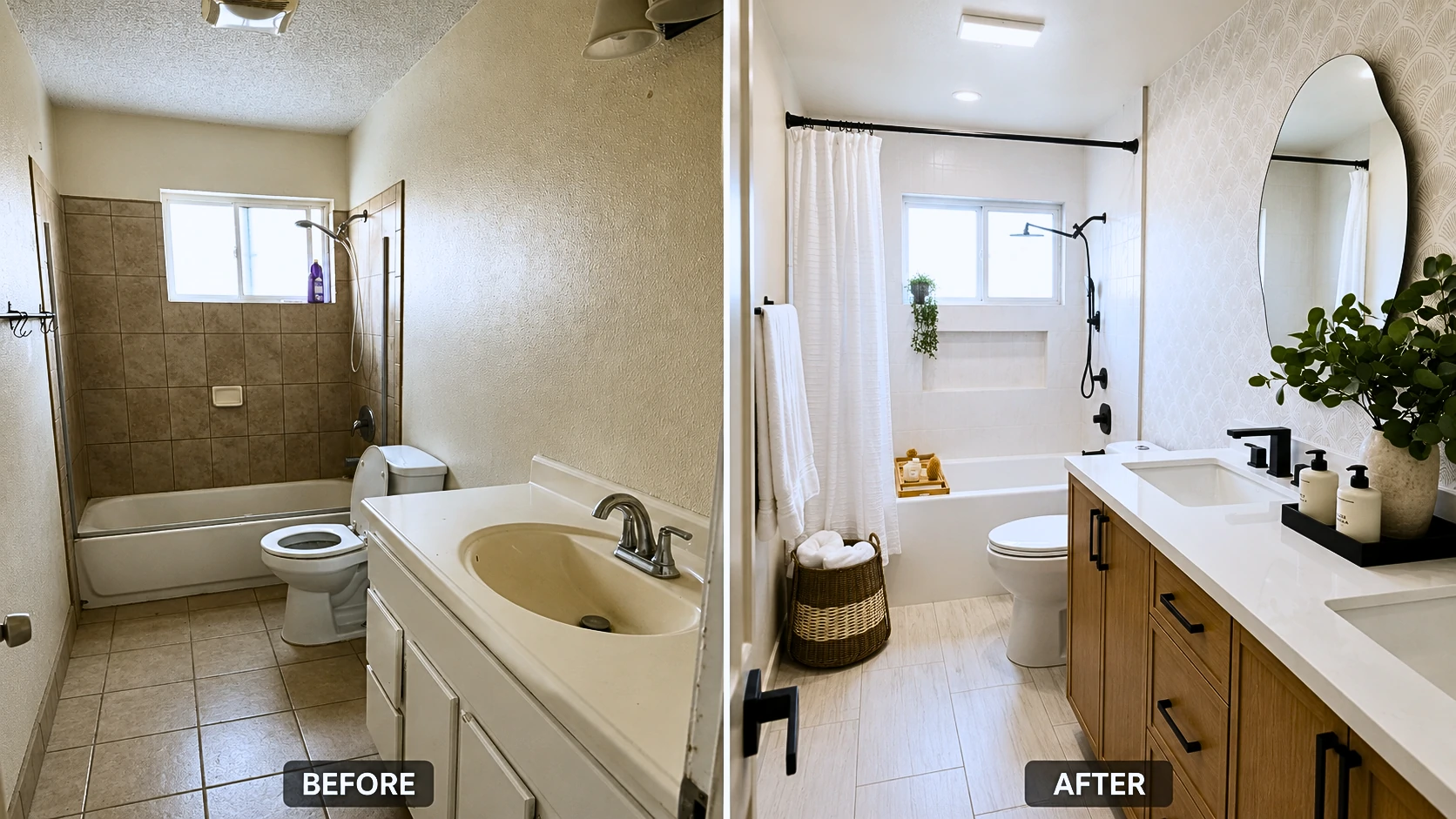
Bathroom Upgrades Homeowners Consistently Love
.webp)
Bidet Attachments — The Upgrade People Laugh at Until They Try One
This is the upgrade with the highest “I can’t believe I waited this long” rate. If you haven’t used one, the reaction feels like social proof; if you have, you already know the reaction is accurate.
The practical case is straightforward. An average household spends $80–$120/year on toilet paper. A mid-range bidet attachment costs $35–$60. Payback is typically under a year. After payback, it’s pure savings.
Cold water reality in cold climates: A cold-water bidet attached to exterior plumbing in Minnesota or Ontario in January will use genuinely cold water. In mild climates, this is barely noticeable year-round. In genuinely cold climates, a heated bidet seat — $150–$300 range — isn’t an indulgence. It’s a practical upgrade.
The Tushy Classic is the standard entry-level recommendation: does exactly what it promises, installs in under 30 minutes with no tools except possibly an adjustable wrench, makes the point immediately. The Bio Bidet SlimEdge steps up with adjustable pressure and a slimmer profile that fits more toilet designs.
Safety reminder: Turn off the toilet water supply valve before installation. Have a towel ready — there will be drips even after shutoff.
Showerhead Replacement — Simplest Upgrade, Daily Impact
Fifteen minutes. Adjustable wrench. Plumber’s tape. That’s the entire install.
What actually matters when choosing a showerhead: flow rate (check local restrictions — California, for example, caps at 1.8 GPM; most areas allow 2.0–2.5 GPM), spray pattern range, and whether handheld or fixed suits your bathroom better. EPA WaterSense certified heads save roughly 20% water usage compared to standard showerheads without meaningfully reducing pressure for most users.
The Moen Attract Magnetix with its magnetic docking handheld deserves a mention — the magnetic connection sounds like a gimmick until you use it daily and realize you never fumble with the holder again.
🇬🇧 UK note: Check thermostatic bar mixer compatibility before buying a pressurized rain shower head. Not all existing UK mixer valves handle the pressure requirements — verify before purchasing.
Under-Sink Water Filtration — When the Bottled Water Math Stops Making Sense
A household spending $30–$50/month on bottled water spends $360–$600/year. A standard under-sink carbon filter costs $50–$100 installed, plus $20–$40 in filter replacements every six months. The math becomes favorable within the first year, and the convenience of unlimited filtered water on tap is worth something independently.
Standard carbon filter vs reverse osmosis: A standard carbon filter removes chlorine, sediment, VOCs, and many heavy metals — sufficient for most municipal water supplies. Reverse osmosis removes more (including dissolved solids and minerals) but wastes 2–4 gallons of water for every gallon filtered. For most urban homeowners on municipal water, carbon filtration is the appropriate choice.
The maintenance issue nobody mentions clearly: An overdue filter doesn’t just stop working — it can actually concentrate contaminants to levels higher than unfiltered water. Set a calendar reminder for replacement on installation day. A six-month filter that runs for 18 months is actively making your water worse.
Safety reminder: Turn off the water supply valve under the sink before beginning. Have towels ready — there will be drips.
Kitchen Upgrades That Cost Almost Nothing and Look Like They Didn’t
Cabinet Hardware — $60 That Can Transform a Kitchen
.webp)
New cabinet pulls and knobs are among the highest visual-impact upgrades per dollar in residential home improvement. Brass hardware on dark-painted cabinets reads as contemporary and deliberate. Simple brushed nickel on white or cream cabinets reads as clean modern. Either combination looks intentional in a way that builder-grade hardware almost never does.
The common mistake: hole spacing varies. 76mm/3 inches (center-to-center) is the most common standard, but it’s not universal. Measure your existing hardware before ordering anything — don’t assume. Also: order 10% more than you think you need. A mis-drilled cabinet door is easier to fix if you have a spare pull.
Calculate quantity carefully: every drawer face typically gets one pull; every door typically gets one pull or knob. Count all of them before ordering.
Faucet Replacement — The DIY Job That Feels More Intimidating Than It Is
Most kitchen faucets use standard mounting hole configurations — one hole for single-handle, three holes for two-handle with sprayer. As long as you match the hole count of your existing faucet, installation is straightforward: turn off supply valves, disconnect the old supply lines, remove the mounting nut, drop in the new faucet, reconnect.
The honest friction point is the old mounting nut under the sink that won’t budge. It’s often rusted or over-tightened, in an awkward position with limited hand clearance. The solution: penetrating oil, 10 minutes of patience, and a basin wrench (a specialized tool, about $15–$20, that makes this job 10 times easier). This one problem causes most DIY faucet replacements to take an hour longer than expected. Know this going in.
How to Prioritize — A Simple Framework for Your Home Upgrade List
Decision paralysis is real in home improvement. The list of things to potentially improve is always longer than the time and budget to do them. These questions cut through it.
✓ 6 Questions to Ask Before Spending a Dollar
☐ Does this affect something I physically interact with every single day?
☐ Will I notice the improvement within the first week — not after six months of adjustment?
☐ What are the hidden costs? (Batteries, subscriptions, replacement parts, hub requirements)
☐ If I move, can I take it with me — or is it easily reversible without damage?
☐ Does it work with my existing smart home platform, or does it create another app silo?
☐ What does maintenance look like at 1 year, 3 years, 5 years?
Start Here: What Do You Actually Want to Improve?
PRIMARY GOAL?
│
├── SAVE MONEY ON BILLS
│   └── Smart thermostat → Weatherstripping → Smart plugs (energy monitoring)
│       └── Advanced: Whole-home energy monitor (Emporia Vue or Sense)
│
├── MAKE DAILY LIFE MORE CONVENIENT
│   └── Smart lock → USB outlets → Motion lights → Smart plugs
│       └── Advanced: Full smart lighting + automations
│
├── IMPROVE HOW YOUR HOME FEELS
│   └── Dimmer switches → Fixture replacement → Fresh paint → Under-cabinet lighting
│       └── Advanced: Smart lighting with scene presets
│
├── IMPROVE LONG-TERM HOME QUALITY
│   └── Water filtration → Air quality → Better insulation → Organization
│       └── Advanced: DIY home energy audit
│
└── NEW TO SMART HOME TECH
    └── 1 smart plug → Learn usage patterns → Smart thermostat → Expand gradually
        └── Buy Matter-compatible devices throughout
What a Complete Smart Home Starter Upgrade Actually Costs
| Upgrade | Budget Option | Mid-Range | Premium |
|---|---|---|---|
| Smart thermostat | $70 (Honeywell RTH9585) | $179 (Ecobee Smart) | $249 (Nest Learning) |
| Smart plugs (4-pack) | $25 (Kasa EP25) | $45 (Wemo Mini 4-pk) | $65 (Lutron Caseta) |
| Dimmer switches (3) | $45 (Leviton 3-pk) | $90 (Lutron Caseta 2-pk) | $150 (Lutron RA2) |
| Smart bulbs (4-pack) | $25 (Govee Wi-Fi) | $55 (LIFX Mini 4-pk) | $120 (Hue White + hub) |
| Under-cabinet LED | $30 (wired standard) | $55 (Kasa LED strip) | $90 (Hue Play) |
| Total | ~$195 | ~$424 | ~$674 |
Budget tier: Fully functional with minor ecosystem limitations. Mid-range: Best value-to-quality ratio for most homeowners — this is the sweet spot. Premium: Only justified if building a multi-room integrated system.
The Stacking Effect — Why 8 Small Upgrades Beat 1 Big One
.webp)
This is the framing shift that changes everything about how to think about home improvement budgets.
No single $400 upgrade transforms a home. But $400 distributed across eight strategic categories — better lighting control, updated fixtures, cabinet hardware, weatherstripping, a bidet, a smart plug, a decent showerhead — creates a compounding effect that feels like a renovation. Better lighting makes a room feel newer. Updated hardware makes cabinets look intentional. A draft-free house feels tighter and quieter. Each improvement makes the others feel more deliberate.
The perception change is real. Visitors notice — they just can’t identify what changed. That’s the best possible outcome from small-upgrade spending.
The Upgrades That Sounded Great — and Delivered Disappointment
For every upgrade that genuinely delivered, there are others that homeowners installed, lived with for six months, and quietly removed or ignored. The frustration isn’t just financial — it’s the time and optimism spent on something that ended up in a drawer. Here’s what consistently disappoints.
Cheap Smart Devices — When Saving $20 Costs More in Frustration
The failure pattern in budget smart devices isn’t always immediate. It shows up at 18 months, when the app gets abandoned by the manufacturer and the device becomes a dumb device with an extra step. Or at month 3, when the Wi-Fi connection becomes intermittent and the “smart” plug requires manual intervention half the time.
The specific failure modes by category:
- Smart plugs: Budget is fine for on/off. Not fine for energy monitoring accuracy.
- Smart bulbs: Cheap no-name LEDs often fail at 6 months, start flickering, and emit light that shifts color temperature over time.
- Smart locks: This is where underspending genuinely creates daily frustration. Connectivity failures on the one device you need to work reliably — your front door — is a specific kind of annoying that wears thin fast.
The rule of thumb: the more frequently you interact with a device, the more the quality difference between budget and mid-range actually matters.
Peel-and-Stick Upgrades — The 6-Month Honeymoon
Peel-and-stick backsplash looks acceptable in photos and feels like a win when you first install it. In a kitchen environment — steam, grease, heat fluctuation — the adhesive begins to fail within months. Corners lift. Seams separate. By the one-year mark, it often looks worse than before.
Removable wallpaper has improved significantly in the past five years, but it still behaves poorly in humid rooms. Bathroom and kitchen applications are where it fails first.
Contact paper works well for low-traffic, low-friction surfaces — inside drawers, shelf lining, the back of shelving units. It fails on any surface that gets touched regularly or exposed to heat.
These products aren’t home upgrades. They’re temporary improvements that have a shelf life. Describing them as anything more than that sets up disappointment.
Over-Automation — When Smart Home Gets Annoying
The trap is subtle: you automate everything, and then you live with a home that acts unexpectedly.
The most common example: motion-activated lights in the living room that turn off while you’re watching a movie because nobody moved for 15 minutes. Or a morning routine that runs correctly on Tuesday but wakes everyone up on Saturday. Or a lock that auto-unlocks when your phone is nearby but unlocks when your neighbor’s phone has the same SSID.
The rule: automate high-frequency, low-attention tasks — outdoor lighting, sleep mode, HVAC scheduling. Keep manual control for anything that requires contextual judgment. Your house shouldn’t be making decisions that surprise you.
Avoid These Before Spending Anything
These are the most common smart home and upgrade mistakes — specific enough to be actually useful:
- Buying smart home devices before choosing a platform ecosystem — pick one voice assistant platform first
- Purchasing a smart thermostat without running the C-wire compatibility check — check before ordering
- Installing smart dimmer switches without verifying neutral wire presence in older homes
- Choosing the cheapest smart lock — the one category where $20 in savings creates consistent daily frustration
- Installing smart bulbs AND a smart switch on the same fixture — they conflict; choose one
- Buying a smart home starter kit instead of building intentionally by use case
- Installing all smart home upgrades simultaneously — learn each device before adding the next
- Neglecting the strike plate when upgrading to a smart lock (replace with 3-inch screws)
- Using foam weatherstripping tape expecting it to last more than one heating season
- Buying non-dimmable LED bulbs, then being surprised when the new dimmer buzzes
Region-Specific Considerations
Most home improvement content is written for US homes in mild climates. If you’re reading this in the UK, Canada, or Australia, some of the standard advice needs adjustment.
UK Homeowners — What’s Different
UK homes use ring main electrical wiring rather than US-style home runs — smart plugs work identically, but smart switches require UK-specific models. US-designed smart switches won’t work in UK switch boxes.
Combi boiler compatibility is the most important check for smart thermostat buyers. Not all configurations are supported by any single brand. Nest has a UK compatibility checker; Ecobee has UK-specific guidance. British Gas Hive is specifically designed for UK systems and worth considering if international compatibility feels uncertain.
Most smart plug listings on UK Amazon are already UK-spec (13A), but verify before buying anything listed as an “import.”
Canadian Homes — Heat-First Upgrade Logic
Extreme cold changes the upgrade priority hierarchy. Before anything else: weatherstripping and a smart thermostat. Heating season runs longer, baseline energy usage is higher, and the ROI on energy-efficiency upgrades is correspondingly better.
Ecobee is worth knowing as a Canadian company — the Toronto-based team has strong understanding of Canadian HVAC configurations and the app handles extreme temperature differentials well. Their freeze protection mode is real and worth configuring before the first hard freeze of the year.
Smart thermostat savings in a climate where the heat runs for six or seven months are genuinely higher than manufacturer claims suggest — because those claims are calibrated to moderate US climates.
Australian Homes — Cooling-First and Solar Integration
In most Australian climate zones, cooling optimization comes before heating. The priority order reverses: smart thermostat for ducted reverse cycle AC is a higher priority than weatherstripping in Perth or Brisbane. In cooler southern zones — Melbourne, Hobart — the logic aligns more closely with northern hemisphere priorities.
For homeowners with solar panels, smart plugs and time-of-use scheduling become genuinely high-value when appliance operation is aligned with solar generation windows. Running the dishwasher, washing machine, and EV charger during peak solar hours is a meaningful cost optimization that basic automation handles well.
Smart pool pump controllers are an AU-specific upgrade worth investigating — pool pumps are significant energy consumers, and automated scheduling around off-peak rates and solar generation is one of the highest-ROI smart home additions available in AU climates.
Common Myths vs What Actually Happens
| The Claim | The Reality |
|---|---|
| ”Smart thermostats save up to 23% on energy bills” | Real-world average for most households: 8–12%. Highly dependent on pre-existing habits and climate zone. |
| ”LED lighting pays for itself in months” | Only if the bulb runs 4+ hours daily. Rarely-used lights can take 2–5 years to break even. |
| ”A smart lock makes your home more secure” | Not if the strike plate uses 1-inch screws. Security starts with the door frame, not the lock. |
| ”Bidet attachments require a plumber” | No. Cold-water bidets install in under 30 minutes with no specialized tools. |
| ”Generic smart plugs are as good as name brands” | For on/off switching: essentially yes. For energy monitoring accuracy: no. For high-draw appliances: never risk it. |
| ”Paint is just cosmetic, not a real upgrade” | Fresh neutral paint in key rooms has one of the highest perceived-value-to-cost ratios in both real estate and homeowner satisfaction research. |
| ”Smart home starter kits are the best way to begin” | Most bundles pair devices that don’t match real use cases or lock you into a single ecosystem. Build intentionally, not by kit. |
Frequently Asked Questions
What home upgrade has the best return on investment?
For resale value, minor kitchen refreshes, bathroom updates, and curb appeal improvements consistently rank highest. For daily quality-of-life ROI, smart thermostats, dimmer switches, and under-cabinet LED lighting rank highest among homeowners — because they affect things you interact with multiple times every single day. These two ROI calculations are different and both valid, depending on your goal.
What is the cheapest home improvement that makes the most difference?
Dimmer switches. At $15–$40 per switch and a 15–20 minute install, they transform the atmosphere of any room immediately. A house with good lighting control feels qualitatively different from one without. Most homeowners who install them say they wish they’d done it years earlier — and that reaction is hard to get from a $20 purchase.
Is a smart thermostat actually worth the money?
For most households, yes — with honest expectations. Real-world savings average 8–12% on heating and cooling costs, roughly $50–$150/year depending on utility rates and climate. At $150–$250 purchase price, payback is typically 1–3 years. If you already have disciplined manual thermostat habits, savings will be smaller. For many people the real value is visibility: seeing exactly where your energy goes changes how you use it.
What home upgrades can renters do without asking the landlord?
Fully reversible upgrades include: smart plugs (unplug on move-out), LED smart bulbs (swap back the originals when leaving), removable organizational systems using Command strips, showerhead replacement (keep the original in the cabinet), bidet attachments (remove on move-out), plug-in under-cabinet LED lighting, and tension-mounted shelving. USB outlet face plate inserts — which replace only the faceplate, not the outlet — also qualify in most lease contexts.
Buy Matter-certified devices wherever available. Matter is the universal smart home standard now supported by Apple, Google, Amazon, and Samsung — devices work across ecosystems without lock-in. This eliminates the single biggest regret pattern in smart home history: buying devices tied to an ecosystem or protocol that got deprecated. Even if you’re adding only two or three devices, choosing Matter-compatible hardware means you won’t regret those purchases as your system grows.
The Honest Takeaway
The goal isn’t a smart home. It’s a home that works — one that reduces friction in daily life rather than adding it.
Eight small upgrades chosen strategically will do more for how your home feels than one expensive renovation chosen impulsively. Better lighting, weatherstripping that actually seals, a thermostat that learns instead of demanding, a front door that works without thinking — none of these make it into magazine spreads. All of them make daily life noticeably better.
The best upgrade isn’t the one with the best specs. It’s the one that reduces friction in something you do every single day. That’s the only ROI metric that ultimately matters — and it’s the one almost no upgrade calculator includes.
Article covers smart home upgrades, energy efficiency improvements, lighting control, bathroom and kitchen upgrades, and home maintenance for US, UK, Canadian, and Australian homeowners. Pricing ranges reflect 2026 market conditions. Always verify product compatibility with your specific home systems before purchasing.
Related Reading:
Smart Toilet Guide: Real Features, Honest Costs & Everything That Changes After You Install One
Home Energy Monitoring Systems: The Complete Homeowner’s Guide (2026)
The Homeowner Maintenance Cheat Sheet That’s Actually Worth Saving
.webp)
.webp)
.webp)
.webp)
.webp)